
Amazon listing optimization in 2026: what to fix, in what order, and how to measure it
Amazon listing optimization, field by field: what to fix first under the 2026 limits, a before-and-after listing, the tools, and how to measure the result.
By Vlad Bazarov · Updated 14 October 2026 · 14 min readAmazon listing optimization is the work of improving a product detail page so that it appears for the searches its buyers type and turns the shoppers it brings into buyers. It is not one task but three: nothing on the page may break a rule that gets the listing suppressed, the indexed fields have to hold the words shoppers search, and what shoppers see on the results page and the detail page has to make them click and buy.
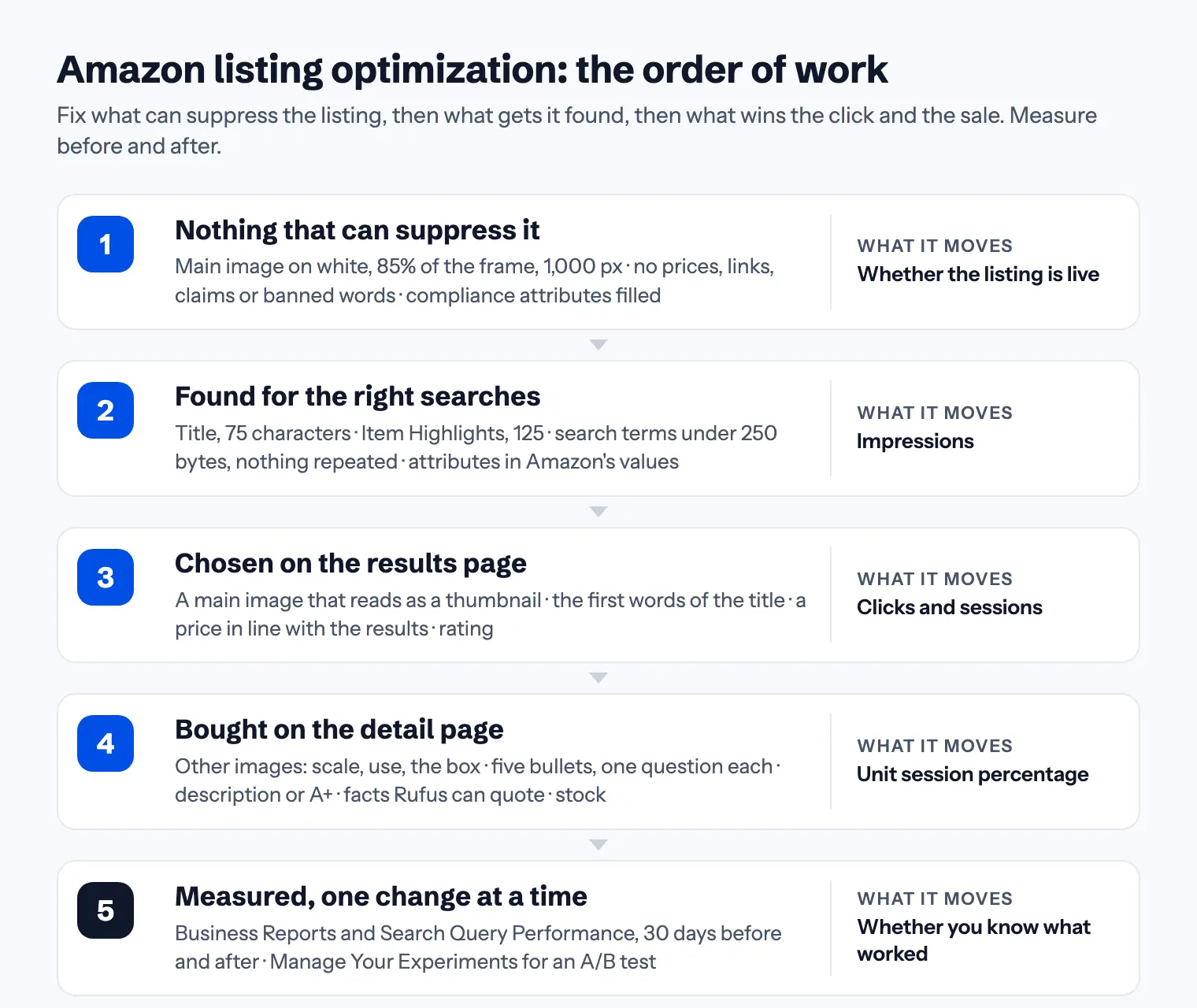
The order matters more than most guides admit. A better bullet point does nothing for a listing whose main image has had it suppressed, and a perfect title brings no sales to a page whose second image still shows last year's pack. This guide goes through the work in the order it pays: what can suppress a listing, what gets it found, what wins the click, what wins the sale, and how to measure whether a change worked. Each section has the rule, the number and the guide that covers that field in full.
What optimizing an Amazon listing changes
Amazon answers a search in two steps: it collects the products whose listings match the search, then orders them, largely by what shoppers click and buy. Amazon SEO in 2026 explains both. For optimization, the useful consequence is that a listing has three numbers, each moved by different parts of the page:
| Number | Where to read it | What moves it |
|---|---|---|
| Impressions | Search Query Performance, Brand Analytics | The words in the title, Item Highlights, bullets, search terms, attributes |
| Clicks and sessions | Search Query Performance; Business Reports | The main image, the first words of the title, the price, the rating |
| Unit session percentage | Business Reports, Detail Page Sales and Traffic | The other images, the bullets, the description or A+, reviews, stock |
Unit session percentage is Amazon's own conversion figure for a product: units ordered divided by sessions, where a session is a visit to the product's pages within a day. Business Reports in Seller Central show it per ASIN, with the sessions and page views next to it, and every seller has access. Search Query Performance, which shows the impressions, clicks, cart adds and purchases behind each search, needs Brand Registry.
Before changing anything, note these three numbers for the last 30 days. Without them you will not know whether the optimization worked.
Step 1: nothing that can suppress the listing
A suppressed listing has no numbers to improve, so the first pass is for rule breaks, not for keywords:
- The main image. A photo of the real product on pure white, filling at least 85% of the frame, 1,000 px or more on the longest side, with no text, badges or props. A main image that breaks these rules is the most common reason a listing disappears from search. See main image requirements.
- Offer details and contact details in the copy. Prices, shipping, promotions, guarantees, website addresses, email addresses and phone numbers belong nowhere in the title, bullets, description or images. Amazon's product detail page rules list them.
- Claims you cannot support. Best-selling, #1, and medical or environmental claims that nothing on the pack backs up.
- Compliance attributes. Country of origin, battery and hazmat declarations, safety certifications where the category asks for them. A missing one can suppress a listing without a message.
- Every child variation. Parents get the attention; children keep the old title or the old image.
The free listing checker flags the banned characters, phrases and formats in the five copy fields in one pass.
Step 2: found for the right searches
The indexed fields decide which searches the listing is in the running for. Each has a limit, a job and a rule against repeating the others:
| Field | Limit | Its job | Guide |
|---|---|---|---|
| Title | 75 characters | Brand, the main search phrase in its natural form, the key filter | The 75-character title rule |
| Item Highlights | 125 characters | Materials, sizes, compatibility and uses the title has no room for | Item Highlights explained |
| Bullet points | 5 × 10–255 characters | One shopper question per bullet, with a checkable fact | Bullet point rules and examples |
| Description | 2,000 characters | The routine, the fit, the caveats, what is in the box, in plain text | Product description rules |
| Search terms | under 250 bytes | Synonyms and searches no visible field holds, lowercase, no repeats | Backend keywords: all 250 bytes |
| Attributes | one of Amazon's values | Material, size, count, colour: what filters, comparison tables and Rufus read | Required attributes |
Two things changed in 2026 that most live listings have not caught up with. Since July 27, 2026 a title in any category except media must fit in 75 characters, and a longer one is replaced by an AI-written version unless the brand owner edits or approves it within 14 days. Item Highlights, the 125-character line shown with the title, is new, and Amazon fills it with its own text when the seller leaves it empty. A listing optimized before 2026 usually has a title that overflows and a highlights line it never wrote.
The keywords themselves come from Amazon: the search box suggestions, Search Query Performance, Product Opportunity Explorer and, if you advertise, the search term report. Amazon keyword research covers the tools and a method, and its planner shows where each phrase goes under the new limits. The one habit that matters most: a word counts once. Amazon indexes the fields together, so a word already in the title buys nothing in the search terms, and every repeat is a search the listing could have matched and does not.
Step 3: chosen on the results page
On the results page a shopper sees the main image, the title, the price, the rating and the delivery promise, and chooses among a row of them in a second or two:
- The main image at thumbnail size. Most clicks are decided here. The product should be recognisable at the size Amazon shows it on a phone, which usually means the product alone, filling the frame, with the side that identifies it facing the camera.
- The first words of the title. Brand, then what the product is. A title that opens with a keyword list reads as spam next to one that opens with a product.
- The price. Amazon's own guidance for sellers says a competitive price can improve search rankings, and on the results page the shopper compares prices before clicking. A product priced well above the row it appears in loses the click however good the page behind it.
- Rating and review count. Reviews come only through allowed means: Amazon Vine for new products, the Request a Review button, and a product that does what its page says. Offering anything in return for a review breaks Amazon's rules and can cost the account.
Step 4: bought on the detail page
The detail page turns a click into a unit session percentage. The parts the listing controls:
- The other image slots. The product in use at real scale, an infographic with three to five facts, how it works, what is in the box, the back of the pack. Every slot answers a question the shopper would otherwise ask, and every piece of text on an image has to match the current copy and the current pack.
- Five bullets, five questions. What is it and how much, what does it do, what is it made of, how is it used, who is it for. One fact per bullet that a shopper can check against the images.
- The description, or A+ Content. The description takes what the bullets could not hold. Brand owners can replace it on the page with A+ Content: image and text modules below the bullets, for the brand's story and the product's features. The plain description still belongs filled, because A+ does not replace it in every placement.
- Facts Rufus can quote. Amazon's shopping assistant answers shoppers' questions from the listing, the reviews and the Q&A. A bullet that states the material, the fit, the capacity and what the product works with can be quoted in an answer; a keyword list cannot. See how Rufus reads a listing.
- Stock. A product that is out of stock collects no sales, and sales are what the ranking learns from. Optimization on a listing that runs out every month is undone each time.
Before and after: one listing, rewritten
The widget below shows a kitchen scale listing as sellers often write one, and the same product rewritten to the rules above. Both versions run through the free listing checker's own rules, so the findings are what the checker would show, not an opinion. Switch to After to see what changed in each field and why.
One listing, before and after
The same kitchen scale, as listings are often written and then rewritten to the rules. Both versions are checked by the free listing checker’s own rules.
- Title158/75over limit
FERRIN Digital Kitchen Scale, Food Kitchen Scale for Baking and Cooking, Kitchen Scales Grams and Ounces, BEST SELLER 11lb Stainless Steel with Tare Function!
- FixOver the 75-character limit by 83; Amazon replaces titles this long with its own
- FixCharacters Amazon rejects in a title: ! (allowed only inside a brand name)
- FixPromotional or guarantee language is not allowed: “BEST SELLER”
- ConsiderALL CAPS is not allowed outside a brand name: FERRIN, BEST, SELLER
- ConsiderA word may appear at most twice: kitchen
- Item Highlights106/125within limit
Digital kitchen scale for food, baking and cooking. High quality and accurate, 100% satisfaction guarantee
- FixPromotional or guarantee language is not allowed: “guarantee”
- ConsiderWrite three to five short fragments separated by a middle dot (·), not a sentence
- ConsiderAlready in the title, so indexed twice for nothing: digital, kitchen, scale, food, baking, cooking
- Bullet points55–96/255within limit
- Bullet 1✅ HIGH PRECISION: measures from 1g to 5kg accurately!!!
- Bullet 2multi units - g, oz, ml, lb. Great for baking, cooking, diet, coffee, jewelry, postage and more.
- Bullet 3Buy now and get FREE SHIPPING, 2 year warranty, contact us at [email protected]
- ConsiderBullet 1: no full stop or other punctuation at the end
- FixBullet 1: Emoji and symbols (™ ® ✓ ★) are not allowed
- ConsiderBullet 2: start with a capital letter
- ConsiderBullet 2: no full stop or other punctuation at the end
- FixBullet 3: Promotional or guarantee language is not allowed: “Buy now”
- FixBullet 3: Links, email addresses and phone numbers are not allowed
- Description138/2,000within limit
<b>Ferrin Kitchen Scale</b><br>The best kitchen scale on Amazon! Buy now, limited time offer $19.99. Visit www.ferrin-scales.com for more.
- ConsiderHTML tags are no longer rendered in descriptions; use plain text with blank lines between paragraphs
- FixPromotional or guarantee language is not allowed: “Buy now”
- FixPrices do not belong in listing copy
- FixLinks, email addresses and phone numbers are not allowed
- Backend search terms274/250 bytesover limit
Kitchen Scale, Food Scale, Digital Scale, kitchen scale, Ferrin, best kitchen scale, B08XYZ1234, scale scale, baking scale, cooking scale, weight scale, kitchen weighing scale, digital food scale, scale for kitchen, scale for food, scale for baking, electronic kitchen scale
- Fix274 bytes; the field must stay under 250 bytes or Amazon may ignore all of it
- ConsiderSeparate terms with spaces only; every comma or semicolon costs a byte and adds nothing
- ConsiderLowercase is enough; Amazon ignores case
- ConsiderListed more than once: kitchen, scale, food, digital, baking
- ConsiderAlready indexed from the visible copy, so these bytes are wasted: kitchen, scale, food, digital, ferrin, best and 2 more
Runs in your browser; nothing you type leaves the page. Check a whole listing
Nothing in the rewrite is clever. It fits the title in 75 characters, writes a highlights line instead of leaving it to Amazon, gives each bullet one question, drops the offer details and the HTML, and fills the search terms with words the visible copy lacks. That is most of what listing optimization is.
Step 5: measure one change at a time
Optimization without a measurement is a guess. Three ways to know whether a change worked, from the simplest up:
- Business Reports, 30 days before and after. Sessions tell you whether the listing is found and clicked; unit session percentage tells you whether the page sells. Change one thing, note the date, and compare the same length of time on either side of it. Seasonality and advertising move the numbers too, so read them against the category, not alone.
- Search Query Performance. With Brand Registry, the report shows, per search, whether impressions, clicks and purchases moved after a title or highlights change. It is the only place to see whether a search the listing newly matches actually brings shoppers.
- Manage Your Experiments. Brand owners with a Professional account can test two versions of a title, a main image, the bullet points, the description or A+ Content against each other on live traffic. Amazon's page for the tool says the "to significance" setting can return a result in as little as four weeks, recommends eight to ten weeks for a fixed duration, and judges by units sold, sales, conversion rate and units per unique visitor. Amazon also states, from its own data, that optimized content can help increase sales by up to 20%; read that as the ceiling, not the expectation.
Amazon's help for the Listing Quality Dashboard says a change can take up to 48 hours to show on the page, and the reports run a day or more behind, so do not read a result in the first week.
Amazon listing optimization tools
Amazon's own tools report real numbers, and most of them are free with a selling account:
| Tool | What it does | Who gets it |
|---|---|---|
| Listing Quality Dashboard | Lists live listings with missing attributes and what filling them enables, such as the product overview and comparison in search | Every seller, in Manage All Inventory |
| Business Reports | Sessions, page views and unit session percentage per ASIN | Every seller |
| Product Opportunity Explorer | Search terms and demand for a niche | Every seller |
| Search Query Performance | Impressions, clicks, cart adds and purchases per search | Brand Registry |
| Manage Your Experiments | A/B tests of a title, image, bullets, description or A+ Content on live traffic | Brand Registry, Professional account |
| Listing checker | A title, Item Highlights, bullets, description and search terms checked against the 2026 limits and rules | Free, on this site, no account |
| Byte counter | The search terms field measured in bytes, with the characters that cost extra | Free, on this site, no account |
Third-party suites add keyword volume estimates, rank tracking and listing builders. They are useful for the research and the tracking; their search volumes are estimates, because only Amazon has the real numbers. The listing checker and the byte counter run in the browser and send nothing.
Common Amazon listing optimization mistakes
- Optimizing a suppressed listing. Check the main image and the compliance attributes before the copy.
- Leaving the 2026 fields to Amazon. A title over 75 characters is rewritten by Amazon's AI, and an empty Item Highlights line is filled by it. Neither version was chosen by you.
- Repeating the title everywhere. The same words in the highlights, the bullets and the search terms match the same searches three times and new ones never.
- Treating the page as text. The main image decides the click and the other images decide much of the sale.
- Changing five things at once. When the numbers move, nobody knows why.
- Measuring too soon, before the change shows on the page and in the reports.
- Letting it run out of stock just as it starts to rank.
A listing optimization checklist
- The three numbers for the last 30 days are written down
- Main image on white, 85% of the frame, 1,000 px, nothing added
- No offer details, contact details, HTML or unsupported claims in any field
- Compliance attributes filled, every child variation checked
- Title within 75 characters: brand, main phrase, key filter
- Item Highlights written, within 125 characters, repeating nothing from the title
- Five bullets, one question each, no end punctuation, no emoji
- Description in plain text; A+ Content published where the brand is registered
- Search terms under 250 bytes with only words the visible copy lacks
- Every attribute holds one of Amazon's own values
- The other image slots answer the shopper's questions, and their text matches the copy
- One change at a time, with a date, and the reports read again after four weeks
For a field-by-field pass over a live listing, use the 30-point listing audit checklist. Every limit is in one table in Amazon listing character limits.
Where Cobalt12 fits
Cobalt12 does the rewrite in this guide from one product photo and an audit of the listings your product competes with: the title within 75 characters, Item Highlights, five bullets, the description, the search terms and the attributes for your product type, each metered against its limit as it is written, plus a set of images for the other slots. The same facts appear the same way in every field, so the page does not contradict itself. You can try it on your own product; the first listing is free.
This article reflects Amazon's published listing limits and rules, its Seller Central tools and its guidance for Manage Your Experiments as of October 2026. Amazon does not publish its ranking formula, and category style guides add requirements of their own.