
Amazon keyword research in 2026: free tools and where each keyword goes
Keyword research on Amazon, step by step: the free tools that show real searches, how to choose keywords, and where each goes in a 2026 listing.
By Vlad Bazarov · Updated 13 October 2026 · 11 min readAmazon keyword research is finding the words shoppers type into Amazon's search box when they look for a product like yours, then deciding which field of the listing each of those words goes in. Amazon's own guide for sellers describes it in three stages: research the keywords, work them into the listing, then watch how they perform and adjust.
The second stage is the one that changed. Since July 27, 2026 titles in every category except media must fit in 75 characters, Item Highlights adds a 125-character line beside them, and the hidden search terms field still takes fewer than 250 bytes. A keyword plan written for 200-character titles packed several phrases into the title; under the new limit most of them need another field. This guide covers the keyword search tools that show what shoppers really type, most of them free, a method for turning their output into a short ranked list, and where each keyword goes, with a planner you can paste your own list into.
How Amazon uses your keywords
A product appears for a search only when its listing matches it. Amazon matches searches against the title, Item Highlights, bullet points, description, search terms and attributes, then orders the matching products, largely by what shoppers click and buy. Amazon SEO in 2026 explains both steps. For keyword research, three things follow:
- Every keyword needs a field. A search that the listing holds neither in words nor in meaning is a search it does not appear for.
- A word counts once. Amazon indexes the fields together, so a word that is already in the title gains nothing from a second place in the bullets or the search terms. Every repeat is room another search could have used.
- Relevance comes before volume. Ranking learns from what shoppers do after a search, so a popular search for a slightly different product is worth less than a smaller one that describes yours exactly.
Short-tail, long-tail and branded keywords
Amazon's guide sorts keywords by length and by brand:
| Kind | Example | What to expect |
|---|---|---|
| Short-tail: one or two words | water bottle | Searched often; the whole category competes for it |
| Long-tail: three or more words | insulated water bottle for hiking | Fewer searches each, less competition |
| Branded | a brand name with a product | Shoppers who already know the brand |
| Non-branded | stainless steel bottle | Shoppers still choosing between brands |
Long-tail searches are more specific and less contested, so they are easier to rank for. Amazon's guide calls keywords that are relevant to the product but face less competition golden keywords, and the long tail is the place to look for them.
Your own brand goes in the brand field and at the start of the title. Other brands' names go nowhere: Amazon's rules keep them out of the detail page and out of the search terms.
Free Amazon keyword tools
The most reliable data on Amazon searches comes from Amazon, and most of it costs nothing:
| Tool | Where to find it | What it shows | Who can use it |
|---|---|---|---|
| Amazon search box | amazon.com | Autocomplete suggestions, based on what customers often search for | Anyone |
| Search Query Performance | Brand Analytics | The searches that led shoppers to your products, with impressions, clicks, cart adds, purchases | Brand Registry |
| Top Search Terms | Brand Analytics | The most searched terms by search frequency rank, and the products shoppers click for them | Brand Registry |
| Search Catalog Performance | Brand Analytics | Impressions, clicks, cart adds and purchases for your own products | Brand Registry |
| Product Opportunity Explorer | Seller Central, under Growth | Search terms and their volume for a niche, grouped by the products shoppers view or buy | Sellers, free |
| Keyword recommendations | Amazon Ads, manual campaign setup | Suggested keywords with suggested bids, based on what customers search for | Advertisers |
| Search term report | Amazon Ads, Sponsored Products | The searches that triggered your ads, with clicks and sales | Advertisers |
Brand Analytics needs a Professional selling account and the Brand Representative role for a brand enrolled in Brand Registry. The ads tools cost nothing to open, but the search term report only covers searches where your ads ran, and the clicks in it are paid for.
Third-party keyword search tools
Keyword suites from other companies estimate search volume from their own data, suggest related terms and track rank over time; Amazon's guide mentions Helium 10 and Jungle Scout among them, and some offer free plans. Treat their volumes as estimates, because only Amazon has the real numbers. For the copy itself there are two free tools on this site: the listing checker tests a draft against Amazon's 2026 limits and rules, and the byte counter measures the search terms field in bytes.
How to do keyword research for Amazon, step by step
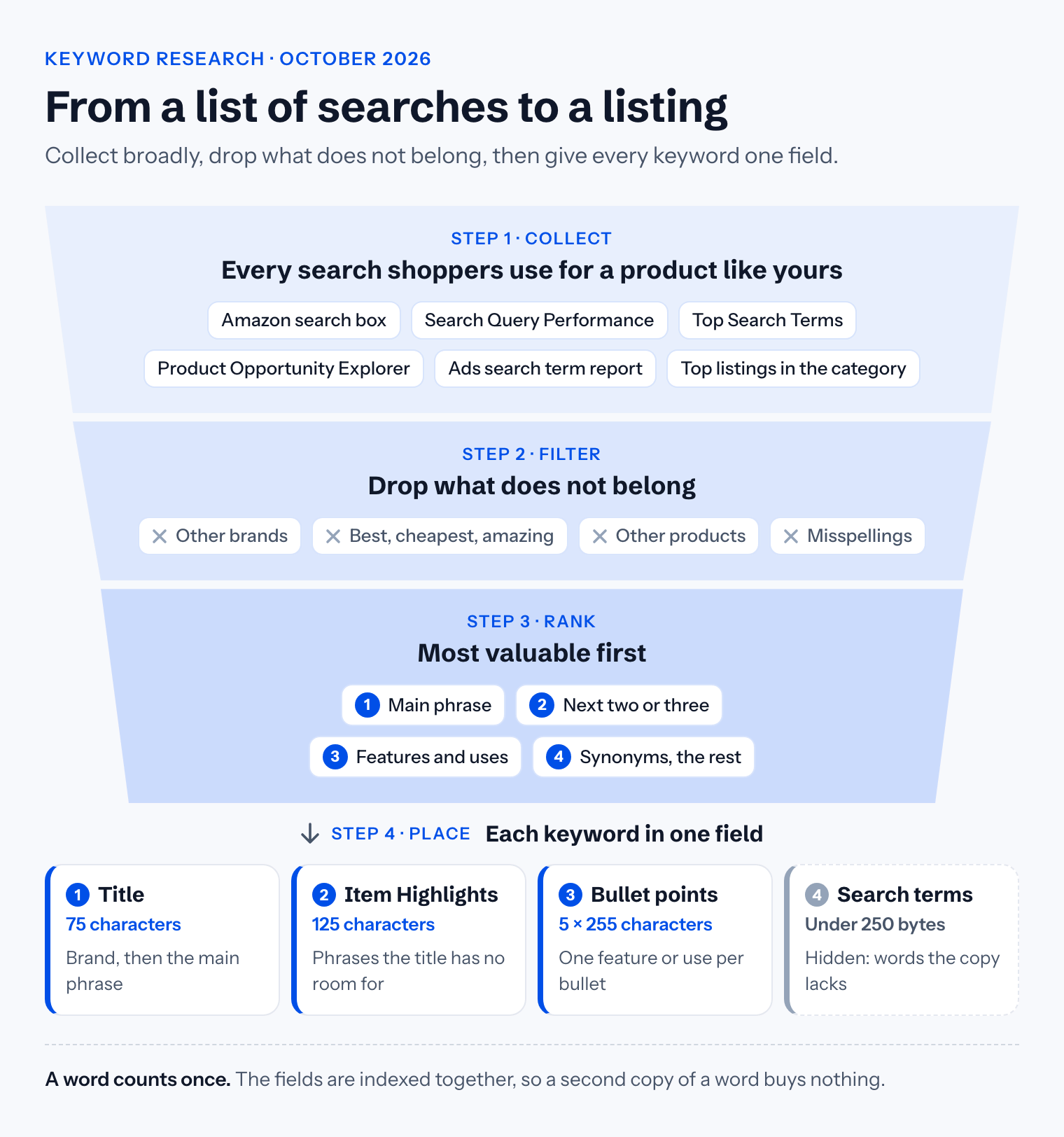
- Write the seed list. What the product is, what people call it, what it is made of, who it is for, what it is used for and what it works with. For a stainless steel bottle: water bottle, flask, canteen, insulated, stainless steel, gym, hiking.
- Expand it in the search box. Type each seed into Amazon's search box and note the suggestions. They come from what shoppers search, and they show the word order people actually use.
- Read the listings that already sell. Search the main phrase and read the titles, Item Highlights and bullets on the first page. Words that recur across them are the vocabulary of the category; keep the ones that are true of your product.
- Add Amazon's numbers. With Brand Registry, Search Query Performance lists the searches that already bring shoppers to your products, and Top Search Terms ranks searches by how often they are made. Product Opportunity Explorer shows the search terms and demand of your niche. If you advertise, Amazon's ads guide suggests running an automatic Sponsored Products campaign for a couple of weeks, then reading its search term report to see which searches perform.
- Filter. Strike every term that is not true of the product, every other brand's name and subjective claims such as best, cheapest or amazing. Drop misspellings too: Amazon's search handles common ones on the shopper's side. A big search for a different product goes, whatever its volume.
- Rank what is left. The main phrase first: the product type in the words most shoppers use. Then the phrases that add a feature, a material or a size, then uses and occasions, then synonyms. Amazon's guide suggests a mix of around 10 to 20 relevant keywords that describe the product accurately: quality over quantity.
- Place them, field by field, as the next section shows.
- Measure and adjust. Once the listing is live, Search Query Performance shows whether impressions and clicks move for the searches you placed, and Search Catalog Performance shows each product's funnel from impression to purchase. Without Brand Registry, Business Reports in Seller Central show each product's traffic and sales. Change one field at a time, so you can tell what made the difference.
Where each keyword goes in a 2026 listing
The ranked list maps onto the listing from the top down:
| Field | Room | What goes there |
|---|---|---|
| Title | 75 characters | The brand, then the main phrase in its natural form, then the fact people filter by |
| Item Highlights | 125 characters | The next two or three phrases, each inside a short fragment |
| Bullet points | 5 × 255 characters | Features and uses, one per bullet, in sentences that answer a question |
| Description | 2,000 characters | The phrases the bullets could not hold, in sentences |
| Search terms | under 250 bytes | Synonyms, other names and long-tail words no visible field holds |
| Attributes | one value per field | Material, size, colour and count, in Amazon's own values, which filters read |
The title carries the main phrase right after the brand, in the order shoppers type it. Amazon's guide says to work the main keyword in naturally and not to stuff the title; the 75-character limit and the rule that a word may appear at most twice leave no room for a list anyway. See the 75-character title rule.
Item Highlights is indexed like the title and shown with it, so it takes the phrases the title had no room for. Each should read as a reason to buy, not as a keyword: Item Highlights explained has the formula.
The search terms take what is left: lowercase words separated by single spaces, with no word the visible copy already holds, no brand names, no ASINs and no punctuation, at 249 bytes or fewer. The full method is in how to use all 250 bytes.
Paste your own list below, one search phrase per line and the most valuable first. The planner places the phrases in that order: the first in the title after your brand, the next two or three in Item Highlights, one per bullet after that, and the words still missing from the visible copy in the search terms, cut at 249 bytes. A phrase with a claim such as best in it, or an ASIN, goes nowhere.
Keyword placement planner
- Title30/75within limit
Hydrova insulated water bottle
45 characters left for the size, count or colour
- Item Highlights78/125within limit
stainless steel water bottle · leak proof water bottle · bpa free water bottle
Work each phrase into a short fragment, separated by a middle dot
- Bullet points5/5 bulletswithin limit
- water bottle for gym
- hiking water bottle
- cup holder water bottle
- metal water bottle
- vacuum flask
One phrase per bullet, inside a sentence that answers a question
- Search terms69/249 byteswithin limit
sports travel reusable canteen cold drinks hot office camping cycling
- Already in the visible copy:
- bottle, flask, bottles, water
- Left out as claims or ASINs:
- best water bottle
Runs in your browser; nothing you type leaves the page. Check a whole listing
The planner does the arithmetic, not the writing: every phrase still has to sit inside a sentence a shopper wants to read. Once the copy is written, run it through the listing checker before you paste it into Seller Central.
Common keyword research mistakes
- Stuffing. Amazon's guide warns that overloading a listing with keywords does not work well and can hurt its ranking.
- Planning for 200 characters. A title plan from before July 2026 now overflows. The phrases that no longer fit belong in Item Highlights and the bullets, not in a longer title.
- Repeating words across fields. Each repeat is a search the listing could have matched and does not.
- Chasing volume. A popular search for a different product brings shoppers who do not buy.
- Other brands' names, in the copy or in the search terms.
- Researching once. Searches change with seasons and trends, and Amazon's guide makes monitoring and adjusting part of the work, not an extra.
A keyword research checklist
- The seed list covers what the product is, what it is made of, who it is for and what it is used for
- Search box suggestions are collected for every seed
- The first page of results has been read for the category's words
- Amazon's own numbers are in: Brand Analytics, Product Opportunity Explorer or the ads search term report
- Nothing on the list is untrue, another brand's name, a subjective claim or a misspelling
- Around 10 to 20 keywords, ranked, the main phrase first
- The main phrase is in the title, after the brand, within 75 characters
- The next two or three phrases are in Item Highlights, within 125 characters
- One feature or use per bullet
- The search terms hold only words the visible copy lacks, at 249 bytes or fewer
- There is a date in the calendar to read the reports again
Where Cobalt12 fits
Cobalt12 does the research and the placement together. It reads the listings your product competes with and, for a listing already on Amazon with Brand Registry, the searches in its Search Query Performance report. Then it writes the title, Item Highlights, bullets, description and search terms within Amazon's 2026 limits, and its research report shows which field each ranked search landed in. You can try it on your own product; the first listing is free.
This article reflects Amazon's keyword research guide for sellers, the Brand Analytics and Amazon Ads documentation and Amazon's listing limits as of October 2026. Dashboards and reports differ by marketplace, so check Seller Central for yours.