
Amazon product detail page: every part, who controls it, and the rules
The Amazon product detail page, part by part: what each section shows, which listing field fills it, who controls a shared page, and the detail page rules.
By Vlad Bazarov · Updated 6 October 2026 · 8 min readAn Amazon product detail page is the page a shopper lands on after clicking a product: the images, the title, the price and buy buttons, the bullets, and below them the product information, the description or A+ Content and the reviews. Amazon keeps one detail page per product. Every seller of that product lists against the same ASIN, and their offers are combined on the same page, so a detail page is shared space with rules of its own.
This guide goes through the page part by part: what each section shows, which field in Seller Central fills it, who decides what appears, and the detail page rules that get listings removed when they are broken.
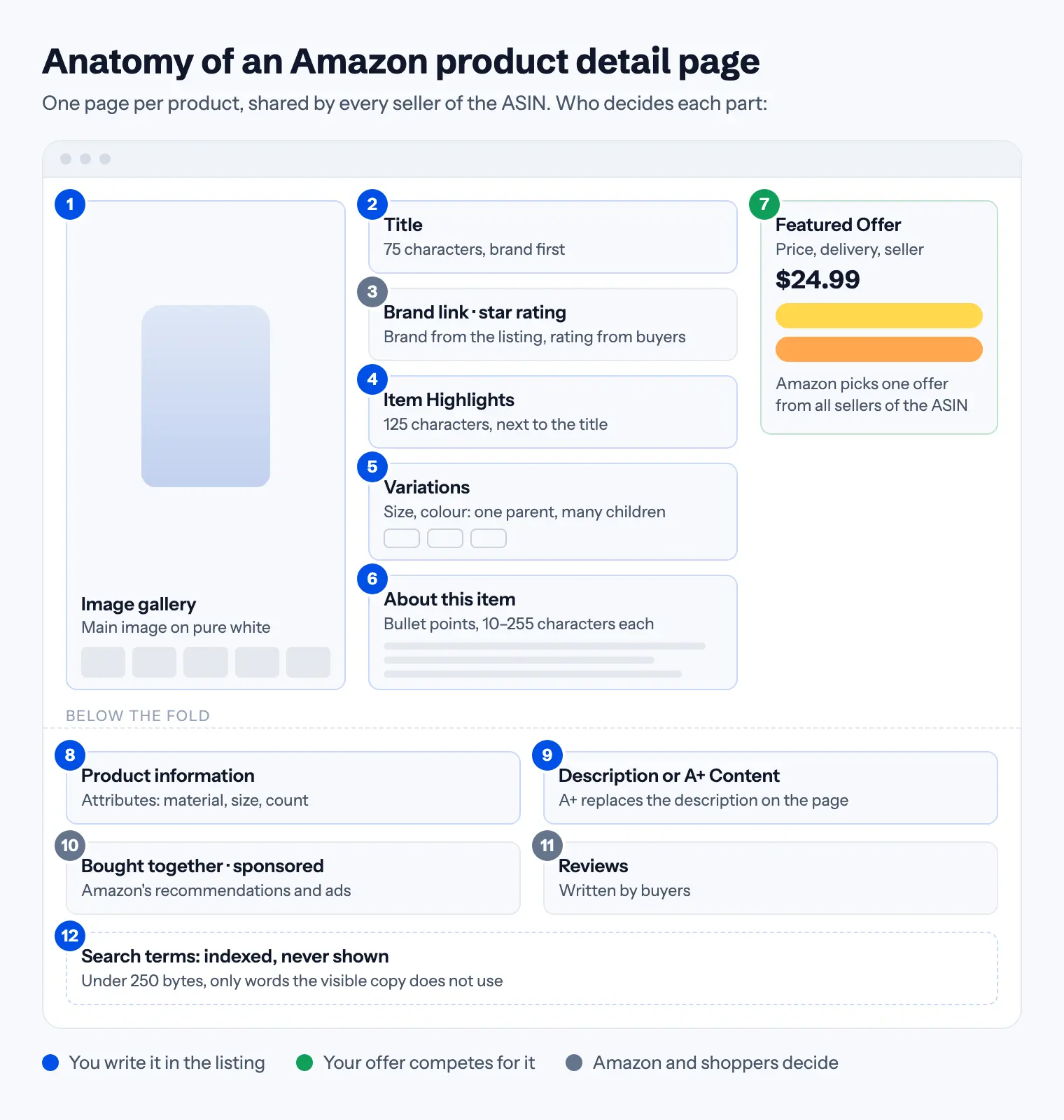
The product page layout, part by part
On a desktop screen the page opens in three columns: the images on the left, the title and bullets in the middle, the Featured Offer on the right. On a phone the same parts stack into one column. Below the fold everything runs full width.
| Part | Where it comes from | Who decides |
|---|---|---|
| Image gallery | The images you upload, main image first | The listing |
| Title | The item name field, 75 characters | The listing |
| Brand link and star rating | The brand field; the rating from customer reviews | The listing; shoppers |
| Item Highlights | The 125-character highlights field | The listing |
| Variations | Parent and child listings with a variation theme | The listing |
| About this item | The bullet points | The listing |
| Price and Featured Offer | Every seller's offer: price, delivery, condition | Amazon picks among the offers |
| Product information | The attributes: material, size, count, compatibility | The listing |
| Description or A+ Content | The description field, or A+ for brand owners | The listing |
| Bought together, sponsored | Amazon's recommendations and advertisers' campaigns | Amazon and advertisers |
| Reviews | Buyers | Shoppers |
Pick any part of the page below to see the field behind it and the rule that matters most.
Amazon detail page, part by part
Pick a part of the page to see who sets it and the rule that applies.
Set in: Images tab: the main image and the other image slots, plus video
The main image is a photo of the product on pure white, filling 85% of the frame, 1,000 px or more for zoom. The other slots are free for lifestyle, infographic and detail shots.
Main image requirementsRuns in your browser; nothing you type leaves the page. Check a whole listing
Above the fold: what a shopper sees first
The image gallery. The main image is the one shown in search results, and it has the strictest rules on the page: a photo of the real product on pure white, filling at least 85% of the frame, with no added text or badges, and 1,000 px or more on the longest side so zoom works. A main image that breaks them can get the listing suppressed. The other slots are where the selling happens: the product in use at real scale, an infographic, the details people zoom in on. The full list is in main image requirements.
The title. Since July 27, 2026 titles must fit in 75 characters, spaces included, in every category except media. Amazon's older detail page rules still mention 200 characters; the newer limit is the one listings are checked against. Brand first, then what the product is, then the one fact people filter by. See the 75-character title rule.
Item Highlights. Up to 125 characters, shown with the title and indexed for search: the materials, sizes, compatibility and uses that no longer fit in 75 characters.
Variations. Sizes, colours and other versions of one product appear as a family on one page: a parent listing that is never sold itself, and a child listing for each version. Each child has its own SKU, its own price and the attributes its variation theme requires. Only real versions of the same product belong in a family.
About this item. The bullet points, up to five in most categories, each 10 to 255 characters. One shopper question per bullet, answered with a fact they can check.
The Featured Offer: one page, many sellers
The box on the right is the Featured Offer, which sellers long called the Buy Box: the offer a shopper buys when they press Add to Cart or Buy Now. When several sellers offer the same ASIN, Amazon chooses which offer is featured. In its own guidance Amazon names four things that count: a competitive price, fast and free delivery, a good record of customer experience (the right item, as described, shipped on time) and stock. An offer that is out of stock cannot be featured, and only sellers on the Professional plan are eligible.
This is the part of the page a listing does not control. Good copy brings shoppers to the page; the offer decides who gets the sale when the product has more than one seller.
Below the fold
Product information. The table of attributes: material, dimensions, count, compatibility and whatever else the product type defines. Filters, comparison tables and Amazon's shopping assistant read these fields, so an empty one is a filter the product never appears in. Amazon required attributes shows how to find the list for your product type.
Description or A+ Content. Plain text up to 2,000 characters, with no HTML. Brand owners enrolled in Brand Registry can add A+ Content, which replaces the description on the page. Fill the description anyway: it is indexed, and it is shown in placements where A+ is not. Details in product description rules.
Recommendations and sponsored placements. "Frequently bought together", related products and sponsored ads are filled by Amazon and by advertisers, which can be other brands on your page or you on theirs.
Reviews. Written by buyers. A detail page may not quote reviews, ask for positive ones or offer anything in exchange for one.
One part of the listing never appears on the page at all: the search terms, under 250 bytes, which Amazon indexes for search but never shows. Use them for words the visible copy does not already contain.
Who controls a shared detail page
Because one page carries every seller's offer, the content on it is not simply the last thing someone submitted. Each seller can contribute product information, and Amazon combines the contributions into the version it displays. Amazon's help pages call the business logic behind this choice detail page control. It is automatic, not something support changes by hand, and it is said to weigh a contributor's record as a seller.
Brand Registry changes the picture for your own brand. Once a brand is enrolled, only the brand owner and sellers associated with it can create or suggest changes to its detail pages through the standard listing tools. For a private-label seller, that is the step that makes the page theirs.
If the page shows something you did not submit, check whether another contribution won, and whether the product type and attributes match what you sent.
Amazon's product detail page rules
Amazon's Product detail page rules in Seller Central apply to every part of the page you write. The ones listings are removed for most often:
- No offer details in the content. Price, availability, condition, shipping and promotions belong in the offer, not in the title, bullets, description or images.
- No contact details or links. No phone numbers, email or postal addresses, website URLs, and no company information in the bullets.
- No reviews or requests for them. No quoted reviews and no solicitation of positive reviews.
- No competitor brand names, and no advertising or watermarks on images or videos.
- No HTML, scripts or other executable code in any field.
- The marketplace's language. Detail page information goes in the local language of the store.
- One page per product. Do not create a detail page for a product that already has one; list against the existing ASIN instead. A new page is for a new product or a new version.
- Valid variations only. A variation family holds real versions of one product, not related products.
- Brand and manufacturer stay as created. Unless you created the ASIN, you may not change or add its brand or manufacturer name.
- Accurate category. Amazon's rules warn that listings found to be deliberately inaccurate, miscategorised or deceptively described to get around its restrictions can lead to corrective action up to the termination of selling privileges.
Category style guides add rules of their own. Check your draft against the limits with the free listing checker before you submit it.
A product page template to follow
Write the page in the order a shopper reads it, and make each part answer a different question:
- Main image: what is it? The product alone, on white, filling the frame.
- Title: is this what I searched for? Brand, product type, the key fact.
- Item Highlights: why this one? The reasons the title has no room for.
- Variations: is there one in my size or colour?
- Bullets: will it work for me? Five questions, five facts.
- Other images: how big is it, how does it work, what is in the box?
- Product information: the specifications, in Amazon's own values.
- Description or A+: the routine, the fit, the caveats.
How the page ranks is a separate question from how it reads: the text gets a product into the results, and what shoppers do on this page decides its place. Amazon SEO in 2026 covers that half, and the step-by-step listing guide covers creating the page in the first place.
Where Cobalt12 fits
Cobalt12 writes the parts of the detail page that come from the listing: the title, Item Highlights, bullets, description and search terms within their limits, the attributes for your product type from Amazon's own value lists, and a set of images from one phone photo. The facts stay the same across every part, so the title, the bullets and the product information table do not contradict each other. You can try it on your own product; the first listing is free.
This article reflects Amazon's product detail page rules, Seller Central and Amazon's Featured Offer guidance as of October 2026. The layout differs by category, device and marketplace, so check a live page in your own category.