
Amazon listing character limits in 2026: every field, with a free counter
Title 75 characters, Item Highlights 125, bullets 255 each, description 2,000, backend search terms under 250 bytes. Every Amazon listing limit in one table, how Amazon counts them, and a counter for characters and bytes.
By Vlad Bazarov · Updated 22 September 2026 · 6 min readMost character-limit tables for Amazon listings were written before 2026, and the two numbers sellers lean on most are the ones that are wrong: titles are no longer 200 characters, and the backend field was never 250 characters. This page keeps the current limits in one place, with a counter you can paste your own text into.
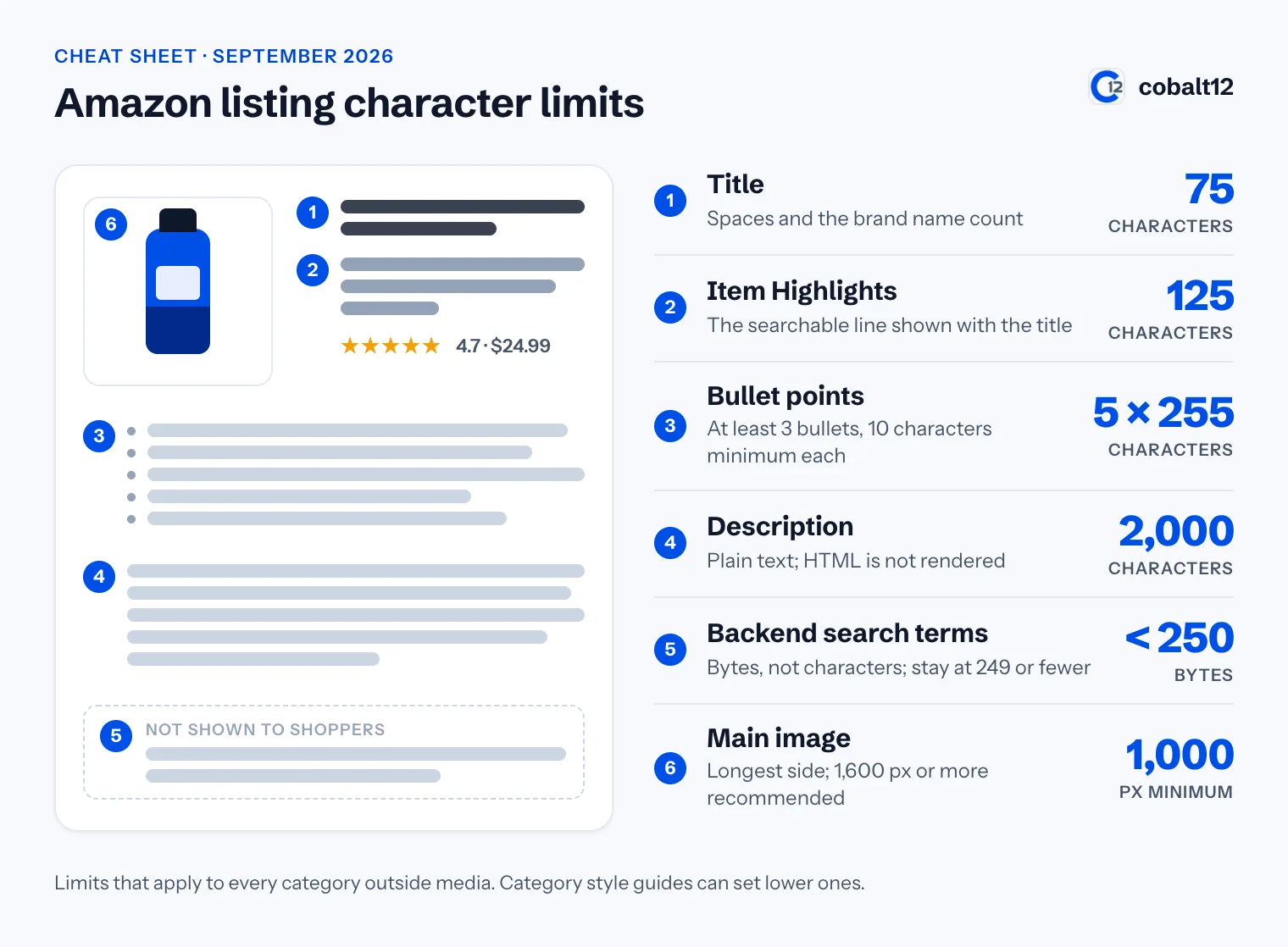
The limits at a glance
| Field | Limit | What to know |
|---|---|---|
| Title | 75 characters | Spaces and the brand name count. In force since July 27, 2026; media is exempt |
| Item Highlights | 125 characters | The new line shown with the title, indexed for search |
| Bullet points | 10–255 characters each | At least three bullets; most categories show five |
| Description | 2,000 characters | Plain text. HTML tags are not rendered |
| Backend search terms | under 250 bytes | Bytes, not characters. Over the limit, Amazon may ignore the whole field |
| Main image | 1,000 px minimum | On the longest side. 1,600 px or more is recommended, 10,000 px is the maximum |
These are the limits that hold across categories. A category style guide can set a lower number, most often for the description, so the template for your product type in Seller Central has the final word.
Count your own text
Pick a field and paste the text. The counter shows characters and bytes side by side, because which of the two matters depends on the field.
Character and byte counter
- Characters
- 68
- Bytes
- 70
- Title
- 7 characters left
Runs in your browser; nothing you type leaves the page. Check a whole listing
How Amazon counts
- Spaces count. So do commas, hyphens and every other punctuation mark.
- The brand name counts toward the 75 characters of the title.
- Every field has its own budget. Characters you do not use in the title do not carry over to Item Highlights, and a short first bullet does not buy a longer second one.
- Each bullet is measured on its own, from 10 to 255 characters.
- The backend field is measured in bytes, and that is where most miscounting happens.
Characters and bytes are not the same thing
In plain English a character and a byte are the same size, which is why the backend limit is so often quoted as “250 characters”. The two part ways as soon as the text leaves basic Latin letters. The German letters ä, ö, ü and ß take two bytes each. Most Chinese, Japanese and Korean characters take three, and so does the euro sign.
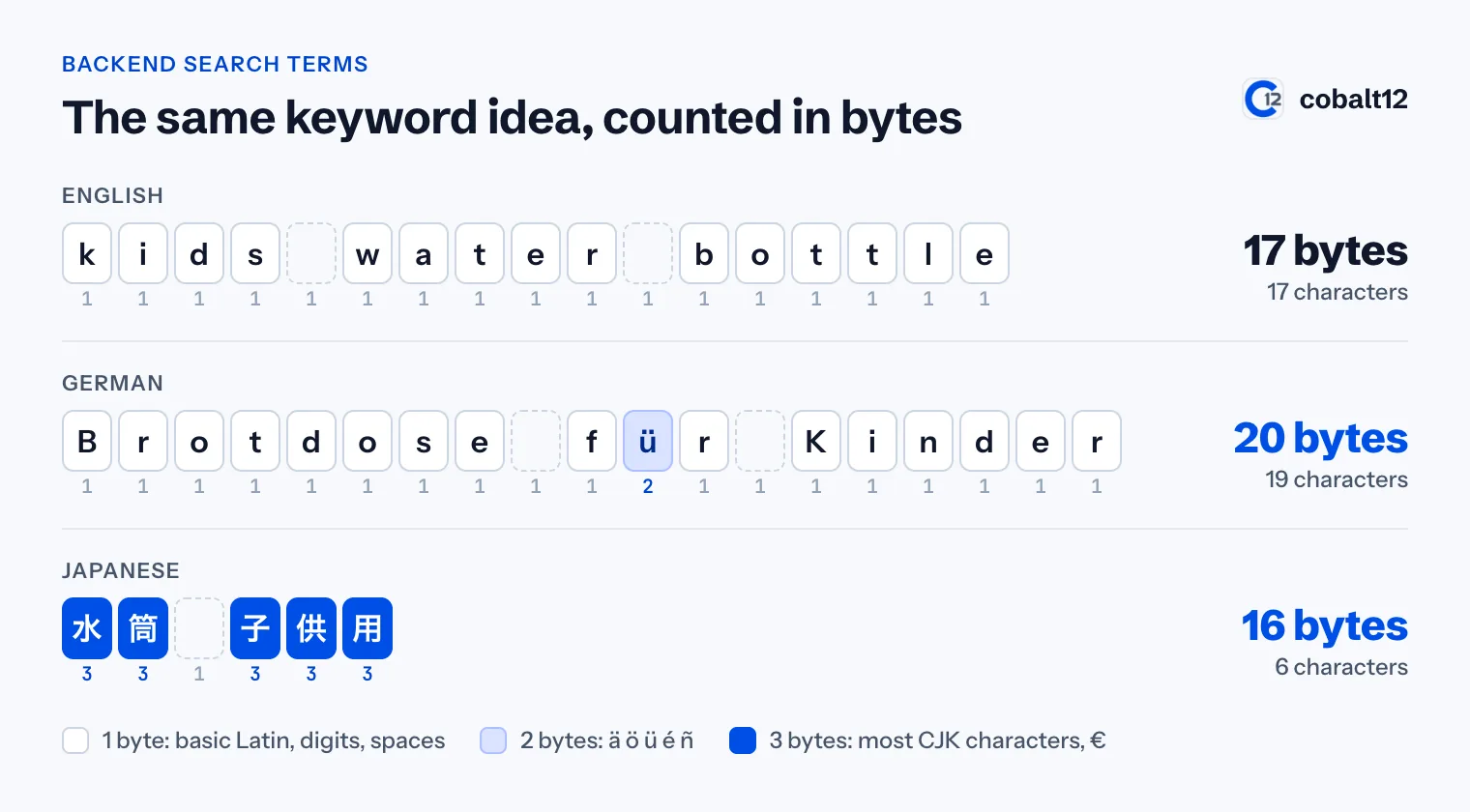
A seller filling the search terms field for amazon.de or amazon.co.jp runs out of room well before the character count says so. If you sell outside the US, count bytes every time; the counter above does it for whatever you paste, and there is a dedicated Amazon byte counter for the search terms field, in German as the Amazon Byte-Zähler. Other marketplaces can also set their own number for this field, so check Seller Central for the one you sell in.
Field by field
Title: 75 characters
The title says what the product is: brand, product type with its main keyword, then the one thing shoppers filter by, such as size, count or colour. Titles still over the limit are replaced by a version Amazon’s AI writes; brand owners get 14 days in the Review Listing Changes tool to edit or approve it. The banned characters and the rule that a word may appear at most twice still apply inside the shorter limit. Full guide: the 75-character title rule.
Item Highlights: 125 characters
The words that used to be crammed into a 200-character title belong here: materials, who it is for, compatibility, supply. Write three to five short fragments separated by a middle dot, and do not repeat the title, because the two lines are indexed together. Full guide: Item Highlights explained.
Bullet points: 10 to 255 characters each
Amazon has checked bullets automatically since August 15, 2024 and can remove the ones that break the rules. Capital letter first, no punctuation at the end, no emoji, prices, promotions or guarantees. The rules are in bullet point rules, and there are 25 example bullets that pass to borrow from.
Description: 2,000 characters
Plain text with blank lines between paragraphs. A <b> tag is no longer rendered; it shows up as text or gets stripped. Fill the field even if you have A+ Content, because it is indexed and it is shown in placements where A+ is not. Full guide: product description rules.
Backend search terms: under 250 bytes
Lowercase words separated by single spaces, and only words the visible copy does not already use. The habit worth having is to stay at 249 bytes or fewer, because going over can cost you the whole field and not only the overflow. Full guide: how to use all 250 bytes.
Images: pixels, not characters
Not a character limit, but it belongs on the same checklist: the main image needs at least 1,000 px on its longest side for zoom to work, a pure white background, and the product filling at least 85% of the frame. Full guide: main image requirements.
Numbers from older guides
You will still meet these, often on the first page of search results:
- 200-character titles. That was the limit until July 27, 2026. A title written to it is now rewritten by Amazon.
- “250 characters” of backend keywords. It has always been bytes. For English text the difference is invisible; for German, French, Spanish or Japanese it can be the difference between a field that is indexed and one that is ignored.
- HTML in descriptions. Amazon stopped rendering tags in 2021. Guides that still recommend
<br>and<b>predate that.
A limit is a ceiling, not a target
- A bullet that runs to the full 255 characters usually holds two ideas that would read better as two bullets.
- A title does not need all 75 characters. It needs the product type and the main keyword first, where both shoppers and search read them.
- Padding the backend field with words from the title buys nothing: Amazon already indexes the visible copy.
- The description is the one field where using most of the room is normal. It is where the detail that did not fit anywhere else goes.
Checklist
- Title at 75 characters or fewer, brand included
- Item Highlights at 125 or fewer, repeating nothing from the title
- Three to five bullets, each between 10 and 255 characters
- Description at 2,000 characters or fewer, with no HTML
- Backend search terms at 249 bytes or fewer, counted in bytes
- Main image at least 1,000 px on the longest side
Where Cobalt12 fits
Cobalt12 reads each field’s limit from Amazon’s schema for your product type and meters the text against it as it writes, so nothing reaches Seller Central over a limit. You can try it on your own product; the first listing is free. To check copy you already have, paste it into the free listing checker: it runs every limit on this page, plus the content rules.
This article reflects Amazon’s published limits as of September 2026. Category style guides can set lower limits, so check Seller Central help for yours.